Key Status Report
The Key Status report allows users to track the status of the physical and digital keys generated for a reservation. This report can be generated for reservations in the following statuses:
-
Arriving
-
In-House
-
Departing
-
Departed
Perform the following steps to generate the report:
Navigate to Reports ➜ Dynamic Reports ➜ Guests/Reservations ➜ Key Status.
Refer to the following table and fill in the fields.
|
Field |
Description |
|---|---|
|
Report Name |
Key Status |
|
Property |
This is a mandatory single-select drop-down list that displays the current property by default. All properties available under the tenant are displayed in the drop-down list. Users can generate the report for the selected property. |
|
Start Date |
This is a mandatory field that displays the current property date by default. Users can select a date that is a maximum of 365 days in the past. |
|
End Date |
This is a mandatory field that displays the current property date by default. Users can select a date that is a maximum of 365 days in the past and 30 days from the start date. |
|
Physical Key Status |
This is an optional multi-select drop-down list that allows users to select from the following physical key statuses to be included in the report.
|
|
Primary Digital Key Status |
This is an optional multi-select drop-down list that allows users to select from the following primary digital key statuses to be included in the report.
|
|
Shared Digital Key Status |
This is an optional multi-select drop-down list that allows users to select from the following shared digital key statuses to be included in the report.
|
|
Key Type |
This is an optional multi-select drop-down list that allows users to select from the following key types to be included in the report.
|
|
Event Type |
This is an optional multi-select drop-down list that allows users to select from the following event types to be included in the report.
|
Click Run to generate the report.
Click Save to save the report under User Favorites section.
Sample Report
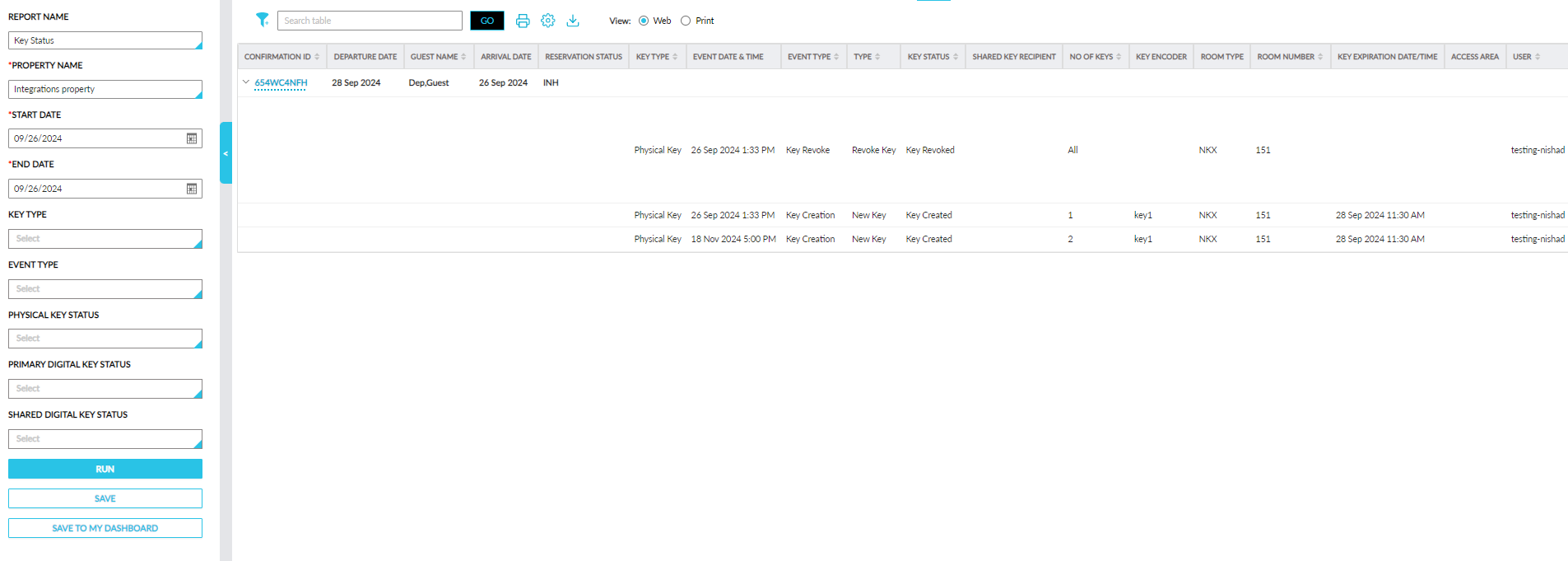
Report Fields
This report displays the following fields:
|
Field |
Description |
|---|---|
|
Confirmation ID |
The reservation confirmation ID displayed as a hyperlink. When clicked, users are navigated to the reservation. An accordion is provided for the confirmation ID that is expanded by default. Users can search and filter records using this value. This column can be sorted. |
|
Guest Name |
The guest name associated with the reservation. Users can search and filter records using this value. This column can be sorted. |
|
Arrival date |
The arrival date of the reservation. |
|
Departure Date |
The departure date of the reservation. |
|
Reservation Status |
The status of the reservation. |
|
Key Type |
The following key types configured in the Reservation Key History section of the reservation.
|
|
Event Date & Time |
The reservation key event date and time. |
|
Event Type |
The following event types configured in the Reservation Key History section of the reservation.
|
|
Type |
The following types configured in the Reservation Key History section of the reservation.
|
|
Key Status |
The following key statuses are displayed for the physical, digital, and shared digital keys: Physical Key Status
Digital Key Status
Shared Digital Key Status
|
|
Shared Key Recipient |
The shared key recipient is displayed along with the loyalty details. |
|
No of Keys |
The number of keys provided for each key type. Users can filter records using this value. This column can be sorted. |
|
Key Encoder |
The key encoder for the keys. |
|
Room Type |
The room type of the reservation. |
|
Room Number |
The room number assigned to the reservation for which the key is generated. Users can search and filter records using this value. This column can be sorted. |
|
Key Expiration Date/Time |
The key expiration date/time for each key event type. |
|
Access Area |
The access areas associated with the reservation. |
|
User |
The username of the user who performed the key action. Users can search and filter records using this value. This column can be sorted. |
|
Reason |
The reason for the key revocation. |
|
Result |
The result of each key event type. |